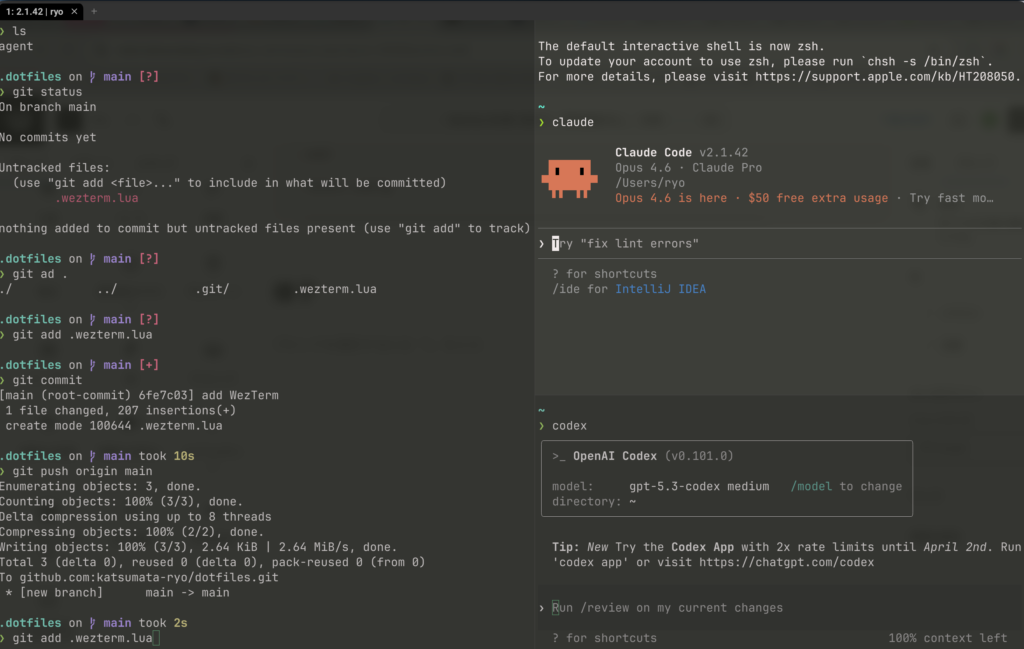
WezTermを使い始めた、開始直後のluaファイル
WezTermを使い始めた。ずっとiTerm2だった。前々職からずっとなので、10年くらい使ってるはず。
AI Agentが良いきっかけになった。開発環境周りががつっとこれから変わってくると思う。
設定ファイル
なお、設定について公式サイトも見てないしluaもかけないので一旦geminiとclaudeとcodexと対話し、おすすめ設定を出してもらい要望を出しながら固めていったらこんな形になった。
-- ~/.wezterm.lua

local wezterm = require 'wezterm'
local act = wezterm.action
local config = {}

if wezterm.config_builder then
  config = wezterm.config_builder()
end

local is_mac = wezterm.target_triple and wezterm.target_triple:find('darwin') ~= nil
local is_windows = wezterm.target_triple and wezterm.target_triple:find('windows') ~= nil

-- ===================
-- 基本
-- ===================
config.automatically_reload_config = true
config.adjust_window_size_when_changing_font_size = false
config.scrollback_lines = 5000
config.window_close_confirmation = 'AlwaysPrompt'

-- macOSでOptionキーをAltとしてアプリに渡す(Option+Enterの改行等に必要)
if is_mac then
  config.send_composed_key_when_left_alt_is_pressed = false
  config.send_composed_key_when_right_alt_is_pressed = false
end

-- bashで起動(ログインシェルとして読み込み)
if not is_windows then
  config.default_prog = { '/bin/bash', '-l' }
end

-- ===================
-- フォント設定
-- ===================
config.font = wezterm.font 'UDEV Gothic 35NF'
config.font_size = 15.0
config.line_height = 1.1

-- ===================
-- カラー・外観
-- ===================
config.color_scheme = 'Monokai (terminal.sexy)'
config.window_background_opacity = 0.9
if is_mac then
  config.macos_window_background_blur = 20
end

-- タイトルバー非表示(リサイズのみ許可)
config.window_decorations = 'RESIZE'

-- ウィンドウ内側のパディング
config.window_padding = {
  left = 8,
  right = 8,
  top = 8,
  bottom = 4,
}

-- ===================
-- タブバー設定
-- ===================
config.use_fancy_tab_bar = true
config.show_tab_index_in_tab_bar = true
config.hide_tab_bar_if_only_one_tab = false
config.tab_max_width = 32

-- ===================
-- ペイン設定
-- ===================
-- 非アクティブペインを暗くして、今のペインを分かりやすく
config.inactive_pane_hsb = {
  saturation = 0.8,
  brightness = 0.6,
}

-- Quick Selectの対象を拡張(URL/メール/Gitハッシュ)
config.quick_select_patterns = {
  'https?://\\S+',
  '[\\w._%+-]+@[\\w.-]+\\.[A-Za-z]{2,}',
  '\\b[0-9a-f]{7,40}\\b',
}

-- ===================
-- タブタイトル
-- ===================
local function basename(path)
  if not path or path == '' then
    return ''
  end
  local normalized = path:gsub('\\', '/')
  return normalized:match('([^/]+)/?$') or normalized
end

wezterm.on('format-tab-title', function(tab)
  local pane = tab.active_pane
  local dir = ''

  local cwd = pane.current_working_dir
  if cwd then
    local value = cwd
    if type(value) ~= 'string' then
      value = value.file_path or tostring(value)
    end
    dir = basename(value)
  end

  local process = pane.foreground_process_name or ''
  process = basename(process)

  local title = dir ~= '' and dir or 'shell'
  if process ~= '' and process ~= 'bash' and process ~= 'zsh' and process ~= 'fish' and process ~= 'pwsh' then
    title = process .. ' | ' .. title
  end

  local index = tab.tab_index + 1
  return string.format(' %d: %s ', index, title)
end)

-- ===================
-- キーバインド (tmux風)
-- ===================
config.leader = { key = 'b', mods = 'CTRL', timeout_milliseconds = 1000 }

config.keys = {
  -- Option+Enter をアプリにパススルー(WezTermデフォルトのフルスクリーンを無効化)
  { key = 'Enter', mods = 'ALT', action = act.SendKey { key = 'Enter', mods = 'ALT' } },
  -- Shift+Enter → Alt+Enter に変換(Claude CodeでWeb UI風にShift+Enterで改行)
  { key = 'Enter', mods = 'SHIFT', action = act.SendKey { key = 'Enter', mods = 'ALT' } },

  -- ペイン分割
  { key = 'v', mods = 'LEADER', action = act.SplitHorizontal { domain = 'CurrentPaneDomain' } },
  { key = 's', mods = 'LEADER', action = act.SplitVertical { domain = 'CurrentPaneDomain' } },

  -- ペイン移動 (hjkl)
  { key = 'h', mods = 'LEADER', action = act.ActivatePaneDirection 'Left' },
  { key = 'j', mods = 'LEADER', action = act.ActivatePaneDirection 'Down' },
  { key = 'k', mods = 'LEADER', action = act.ActivatePaneDirection 'Up' },
  { key = 'l', mods = 'LEADER', action = act.ActivatePaneDirection 'Right' },

  -- ペインサイズ変更 (Leader + 矢印)
  { key = 'LeftArrow', mods = 'LEADER', action = act.AdjustPaneSize { 'Left', 5 } },
  { key = 'DownArrow', mods = 'LEADER', action = act.AdjustPaneSize { 'Down', 5 } },
  { key = 'UpArrow', mods = 'LEADER', action = act.AdjustPaneSize { 'Up', 5 } },
  { key = 'RightArrow', mods = 'LEADER', action = act.AdjustPaneSize { 'Right', 5 } },

  -- ペインズーム (Leader + z)
  { key = 'z', mods = 'LEADER', action = act.TogglePaneZoomState },

  -- ペインを閉じる (Leader + x)
  { key = 'x', mods = 'LEADER', action = act.CloseCurrentPane { confirm = true } },

  -- タブ操作
  { key = 'c', mods = 'LEADER', action = act.SpawnTab 'CurrentPaneDomain' },
  { key = 'n', mods = 'LEADER', action = act.ActivateTabRelative(1) },
  { key = 'p', mods = 'LEADER', action = act.ActivateTabRelative(-1) },

  -- タブを番号で直接選択 (Leader + 1-5)
  { key = '1', mods = 'LEADER', action = act.ActivateTab(0) },
  { key = '2', mods = 'LEADER', action = act.ActivateTab(1) },
  { key = '3', mods = 'LEADER', action = act.ActivateTab(2) },
  { key = '4', mods = 'LEADER', action = act.ActivateTab(3) },
  { key = '5', mods = 'LEADER', action = act.ActivateTab(4) },

  -- 検索
  { key = 'f', mods = 'LEADER', action = act.Search { CaseInSensitiveString = '' } },
  { key = 'o', mods = 'LEADER', action = act.QuickSelect },
}

-- OSごとの一般的なコピペショートカット
if is_mac then
  table.insert(config.keys, { key = 'c', mods = 'CMD', action = act.CopyTo 'Clipboard' })
  table.insert(config.keys, { key = 'v', mods = 'CMD', action = act.PasteFrom 'Clipboard' })
elseif is_windows then
  table.insert(config.keys, { key = 'c', mods = 'CTRL|SHIFT', action = act.CopyTo 'Clipboard' })
  table.insert(config.keys, { key = 'v', mods = 'CTRL|SHIFT', action = act.PasteFrom 'Clipboard' })
else
  table.insert(config.keys, { key = 'c', mods = 'CTRL|SHIFT', action = act.CopyTo 'Clipboard' })
  table.insert(config.keys, { key = 'v', mods = 'CTRL|SHIFT', action = act.PasteFrom 'Clipboard' })
end

-- ===================
-- 起動時レイアウト
-- ┌────────┬────────┐
-- │ │ Claude │
-- │ 作業 ├────────┤
-- │ │ Codex │
-- └────────┴────────┘
-- ===================
wezterm.on('gui-startup', function(cmd)
  local _tab, left_pane = wezterm.mux.spawn_window(cmd or {})

  -- 左右を均等に分割(右側を作成)
  local right_pane = left_pane:split {
    direction = 'Right',
    size = 0.5,
  }

  -- 右側を上下に分割(下側を作成)
  right_pane:split {
    direction = 'Bottom',
    size = 0.5,
  }

  -- 左ペイン(作業用)にフォーカス
  left_pane:activate()
end)

return config
様子