YARDでrailsのドキュメント作成
Railsのドキュメント作成をする際に、調べ物をしていたらYARDというものがあったので試しに使ってみました。
環境
- ruby 2.2.2p95
- yard 0.8.7.6
- mac 10.10.4
インストール
まずはインストールから。gemからインストールします。
$ gem install yard — no-ri — no-rdoc
Successfully installed yard-0.8.7.6
1 gem installed
使用例
次に今回の使用例です。
ソースに追加
yardには色々なタグで綺麗に出力をする方法が有ります。
まずは簡単な方法でソースコードに追記
変更前例
class ProcessReload
def initialize(program)
case program
when 'httpd'
pid_file = File.join(DEFAULT_ROOT, 'var', 'run', 'httpd', "#{program}.pid")
when 'drweb-monitor'
pid_file = File.join(DEFAULT_ROOT, 'var', 'drweb', 'run', "#{program}.pid")
end
@pid = File.open(pid_file, "r").read.chomp.to_i
end
def reload
Process.kill(:HUP, @pid)
end
end
変更後
class ProcessReload
# initialize method
# @param [String] program 再起動するプロセス名(現在はhttpdとdrweb-monitorのみ)
def initialize(program)
case program
when 'httpd'
pid_file = File.join(DEFAULT_ROOT, 'var', 'run', 'httpd', "#{program}.pid")
when 'drweb-monitor'
pid_file = File.join(DEFAULT_ROOT, 'var', 'drweb', 'run', "#{program}.pid")
end
@pid = File.open(pid_file, "r").read.chomp.to_i
end
# @pidに格納したプロセスの再起動
def reload
Process.kill(:HUP, @pid)
end
end
この雰囲気で修正し実行してみました。
ドキュメント作成コマンドを実行
$ yardoc lib/hosting/hosting_process.rb
Files: 1
Modules: 1 ( 1 undocumented)
Classes: 1 ( 1 undocumented)
Constants: 0 ( 0 undocumented)
Methods: 2 ( 0 undocumented)
50.00% documented
すると doc/ ができています。
$ ls -R doc
Hosting file_list.html
Hosting.html frames.html
_index.html index.html
class_list.html js
css method_list.html
file.README.html top-level-namespace.html
doc/Hosting:
HostingProcess.html
doc/css:
common.css full_list.css style.css
doc/js:
app.js full_list.js jquery.js
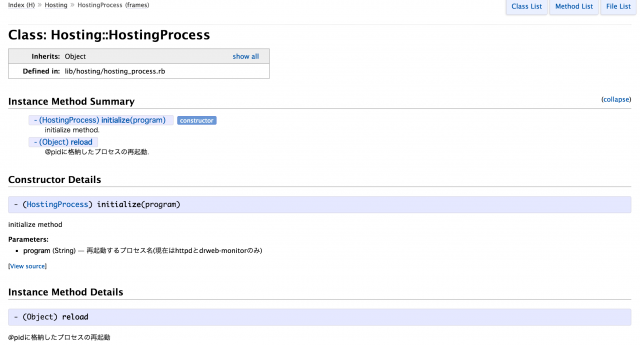
するとこんなかんじにページが出来てます。
すごー。
Railsの単位でドキュメントを作成してみる
Rakeタスクを使う方法が紹介されていました。
Gemfileに追加
Gemfile
gem 'yard', group: :doc
その後 bundle install します
taskファイルを作成
lib/tasks/yarddoc.rake
require 'yard'
require 'yard/rake/yardoc_task'
namespace :doc do
YARD::Rake::YardocTask.new do |t|
t.files = %w(
app/models/**/*.rb
app/controllers/**/*.rb
app/helpers/**/*.rb
app/mailers/**/*.rb
lib/**/*.rb
)
t.options = []
# t.options = %w(--debug --verbose) if $trace
end
end
すると
$ rake -T |grep yard
rake doc:yard # Generate YARD Documentation
と実行できるようになるのでyardの書式を特に追加せずにやってみます。
実行する際は rails のトップ階層で行います。
$ rake doc:yard
### 特にyardに対応した方法でなにも書かずに実行したので結構エラーが。
Files: 247
Modules: 92 ( 73 undocumented)
Classes: 324 ( 153 undocumented)
Constants: 459 ( 93 undocumented)
Methods: 3600 ( 443 undocumented)
82.97% documented
こんな感じでアウトプットされます。
GCとか自分が書いた物以外も出力されてしまっているのでこれをどうにかしたい。
トップにmarkdownがあるとインデックスファイルにそれを表示してくれるのすごいですね。
参考記事
ありがとうございます。
[http://blog.falconsrv.net/articles/449](http://blog.falconsrv.net/articles/449)